



Interactive Guide
Videos
A Day In The Life With IRIS Ally
Frequently Asked Questions
Place the IRIS Ally in the charging cradle or press and hold the Help button for 3 seconds.
You can wear your IRIS Ally around your neck with the included lanyard, or clipped to your belt or waist so it is always within reach.
Test your device monthly by pressing the Help Button and placing a test call to the monitoring center to ensure it’s working properly.
If you accidentally press the help button, press and hold again to cancel the call. Emergency first responders like fire or EMT will not automatically show up at your door if you accidentally make a call.
First login to your Consumer Cellular account. After logging in, you can update your address, telephone number, secondary address and more. You can also add, edit and remove emergency contacts.
- Plug in the charging dock.
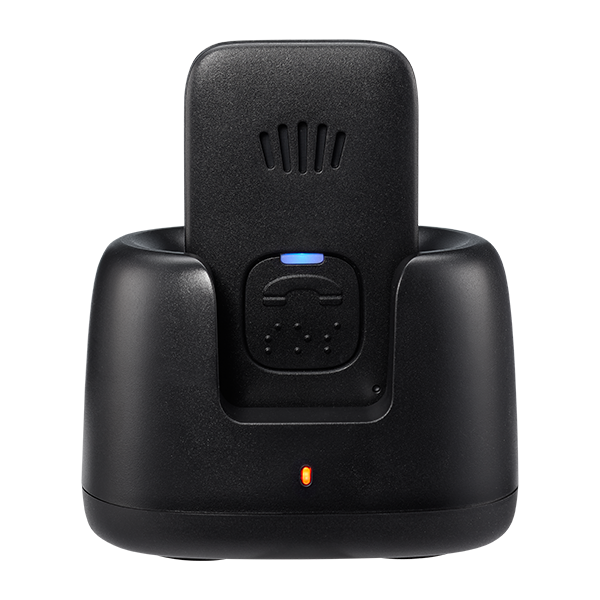
- Place your IRIS Ally into the charging dock. When fully charged, the light will change to a solid blue. Your IRIS Ally needs to charge for a full two hours before it’s ready for action.
- Once charged, perform a first-time test by pressing and holding the Help Button until you hear “Calling the Emergency Call Center” and are connected with an agent who will update your emergency contacts and any personal information.
- Place your IRIS Ally in the charging dock.
- When fully charged, the light will change to a solid blue.
- Remove the device from the dock.
- Press the battery button for 2 seconds.
- Your Ally will say “battery low” or “battery OK.”
Extra Tips for a Seamless Set Up
Be sure your charging dock is not plugged into an outlet controlled by a light switch. Be sure your IRIS Ally is completely connected to the charging dock.
Your IRIS Ally uses GPS and cellular technology to identify your location and communicate. The IRIS Ally’s location, service availability, and other issues may disrupt calling the Emergency Response Center.
In the event there is no cellular coverage, the IRIS Ally will flash red while wearing the device. If the call cannot be placed due to no cellular connection the device will announce, “Call failed”, try again. Attempt to place the call again or move to an area with better cellular service.
The two-way speaker provides clear communication with our trained Response Specialists. If you are unable to speak, they will still dispatch help.
With the help button you’ll receive help 24 hours a day, 7 days a week, 365 days a year with just the push of a button and connect to one of our trained Response Specialists who will dispatch help to your location.
Yes, the IRIS Ally is shower safe and water resistant to give you peace of mind wherever you are.
- Plug in your Ally charging dock.
- Place your Ally into the charging dock.
- Charge for 2 hours.
- Press and hold the help button to perform a test call to the help center.
- Wear your Ally and get moving.
To use the IRIS Ally, press the emergency button whenever you're in need. Your device will automatically connect with an emergency responder. From there we will assess your needs and dispatch emergency help to your location.